What Is iPadOS? Features, Compatibility, and Differences
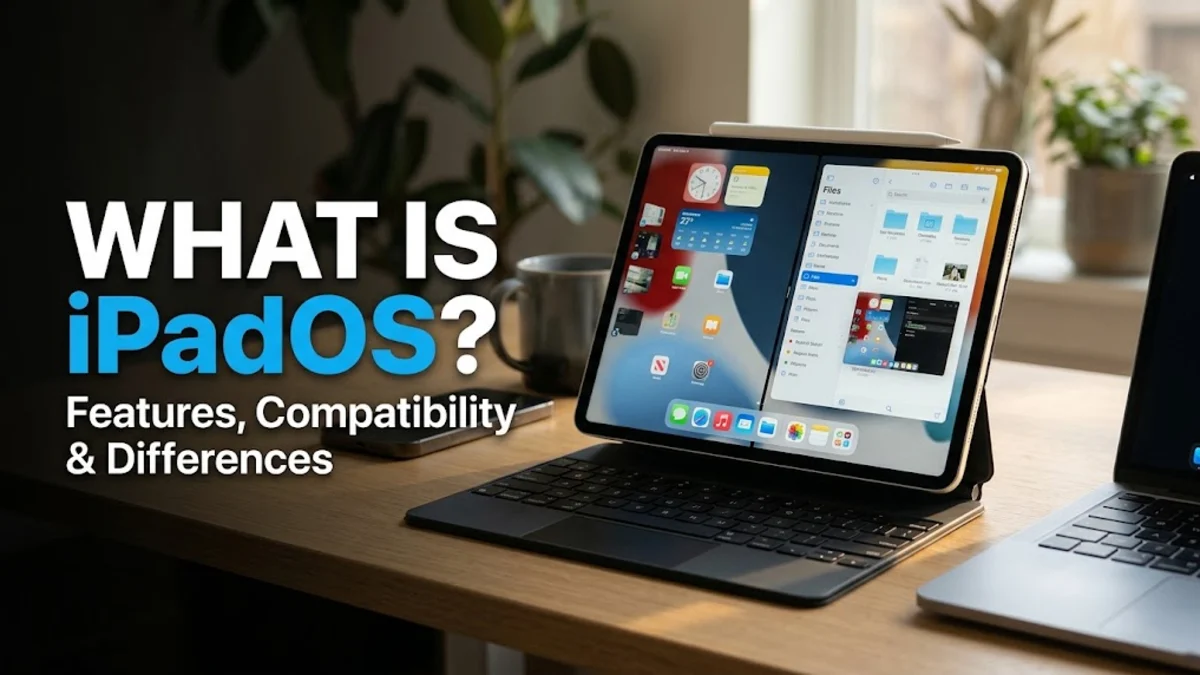
iPadOS is the specialized operating system developed by Apple exclusively for its iPad lineup, designed to maximize the tablet's larger screen real estate and hardware capabilities. Originally built as a branch of iOS, it has evolved into a distinct platform tailored for enhanced productivity, multitasking, and accessory support.
Understanding what iPadOS offers helps you take full advantage of your device, whether you use it for casual media consumption, digital art, or heavy professional workflows. Below, we break down its core features, hardware compatibility, and how it differs from traditional mobile operating systems.
The Evolution and Purpose of iPadOS
For many years, Apple tablets ran on iOS, the same operating system that powered iPhones. However, as iPads grew larger, more powerful with desktop-class M-series chips, and increasingly relied on accessories like keyboards and mice, Apple realized that a mobile phone operating system could no longer meet the advanced demands of tablet users. In 2019, Apple officially split the software path by introducing iPadOS, signaling a major shift in how the company approached tablet computing.
The primary goal of iPadOS is to bridge the gap between traditional smartphones and full-fledged laptop computers. By tailoring the user interface specifically for larger displays, Apple created an environment where users can manage complex file structures, run multiple applications simultaneously, and interact with touch, stylus, and trackpad inputs seamlessly. This deliberate separation allows Apple to introduce tablet-exclusive features without compromising the simplicity and security that users expect from iOS.
Key Features That Define iPadOS
One of the most defining characteristics of iPadOS is its advanced multitasking suite. Features like Slide Over and Split View allow users to run multiple applications side by side on the same screen, making it easy to drag and drop text, images, and links between them. Additionally, Stage Manager provides a windowed interface experience similar to macOS or Windows, letting you resize windows, overlap applications, and switch between different workspaces quickly.
Another crucial component is the Files app, which brings traditional desktop file management to the iPad. It allows users to organize local storage, connect external hard drives and USB flash drives, and integrate cloud storage providers like iCloud Drive, Google Drive, and Dropbox into a single interface. Combined with system-wide keyboard shortcuts and rich accessory integration, these features transform the tablet from a simple media viewer into a versatile workstation.
iPadOS vs iOS: Understanding the Core Differences
While iPadOS shares a common codebase and visual language with iPhone's iOS, several fundamental differences set them apart. The most obvious difference is the user interface scaling and home screen design. iPadOS accommodates widgets of various sizes anywhere on the home screen alongside app icons, whereas iOS has historically maintained a more rigid app grid structure. Furthermore, iPadOS incorporates specific accessibility and navigation tools designed explicitly for external keyboards, trackpads, and the Apple Pencil.
Under the hood, iPadOS supports more robust external display connectivity, allowing users to hook their tablets up to external monitors with full native resolution support rather than just mirroring the built-in screen. Apps optimized for iPadOS are also built to utilize the expanded hardware headroom of Apple silicon chips, offering desktop-class rendering capabilities in software designed for graphic design, video editing, and audio production.
Hardware Compatibility and Device Support
Apple designs iPadOS to run across a wide array of tablet models, ranging from entry-level options to high-end professional devices. However, because older hardware components lack the processing power or unified memory architecture required for advanced features like Stage Manager or external display support, certain software capabilities are restricted to specific iPad models equipped with M-series processors or recent A-series chips.
When a new version of iPadOS is released, Apple provides a clear compatibility list detailing which iPad Air, iPad Pro, iPad mini, and standard iPad models will receive the update. It is always recommended to check your specific device model number in your settings before attempting a major operating system upgrade to ensure full compatibility with the features you rely on daily.
Productivity and Accessory Integration
The true power of iPadOS shines when paired with Apple and third-party accessories. The Apple Pencil is deeply integrated into the operating system, enabling features like Scribble (which converts handwritten text into typed text in any text field), quick screenshot annotation, and precise pressure-sensitive drawing in creative applications. The operating system handles palm rejection and latency natively, ensuring a fluid, paper-like writing and drawing experience.
Similarly, connecting external accessories such as Magic Keyboards, Bluetooth mice, and USB hubs transforms how you navigate the device. iPadOS replaces the traditional finger touch cursor with a contextual circular pointer that adapts to whatever interface element it hovers over. This level of precise control makes text editing, spreadsheet management, and web browsing feel remarkably similar to working on a traditional laptop.
How to Keep Your iPadOS Updated and Secure
Keeping your iPadOS software up to date is essential for maintaining system stability, accessing new features, and protecting your personal data against emerging security vulnerabilities. Apple regularly releases software updates that include critical security patches alongside performance optimizations. You can check for available updates at any time by navigating to Settings > General > Software Update on your device.
To make the process effortless, you can enable automatic updates within the same menu. When enabled, your iPad will download and install software updates overnight while connected to Wi-Fi and charging, ensuring you always run the latest version without having to manage manual downloads. Regularly backing up your device via iCloud or a computer ensures your data remains safe during any major software transition.
The bottom line
iPadOS has transformed Apple tablets from oversized smartphones into powerful, flexible computing devices capable of handling demanding professional and personal workflows. By offering dedicated multitasking tools, robust file management, and seamless accessory integration, it delivers a unique balance of simplicity and advanced functionality that continues to shape the future of modern mobile computing.
Frequently asked questions
Is iPadOS the same thing as iOS?
No. While iPadOS is derived from iOS and shares a similar visual design, it is a separate operating system optimized specifically for the larger screens, hardware capabilities, and multitasking features of Apple tablets.
Can I install iPadOS on my iPhone?
No, iPadOS is designed exclusively for Apple iPad models and cannot be installed on iPhones, which run standard iOS.
Do all iPads support the latest version of iPadOS?
Not all older iPad models support every new software release. Apple phases out software support for older hardware over time based on processor limitations and RAM requirements.
How do I check my current iPadOS version?
You can check your software version by opening Settings > General > About on your iPad and looking at the iPadOS Version field.
Does iPadOS support mouse and keyboard use?
Yes, iPadOS features native support for Bluetooth and wired keyboards, mice, and trackpads, complete with a contextual cursor and keyboard shortcut navigation.