Router vs Access Point: What Is the Difference?
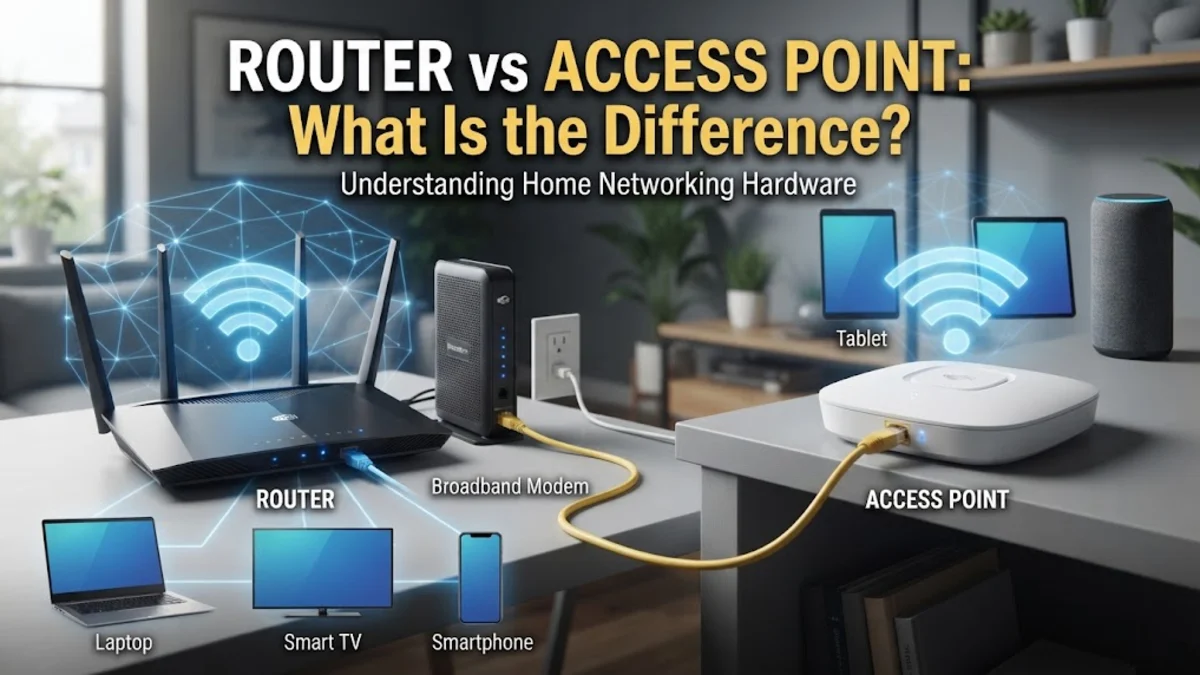
When setting up or expanding a computer network, understanding the hardware components is essential for reliable performance. While both routers and access points manage network traffic, they serve fundamentally different roles in how devices connect to the internet.
What Is a Router?
A router is the central traffic controller of your home or office network. It connects your local network to the wider internet, acting as a translator and gatekeeper for all incoming and outgoing data packets. Every device on your network—whether connected via an Ethernet cable or Wi-Fi—relies on the router to assign local IP addresses through DHCP, translate private addresses to public ones via NAT, and provide basic firewall security.
In a standard residential setup, the device provided by your internet service provider is usually a combination unit that includes a modem, a router, and a wireless access point built into a single box. Standalone enterprise routers handle heavy routing protocols, manage virtual local area networks, and direct high-speed data across vast corporate infrastructures without necessarily broadcasting a wireless signal themselves.
What Is an Access Point?
A wireless access point, often simply called an access point or AP, is a networking device that creates a wireless local area network, typically inside a large building or office area. Unlike a full router, an access point does not manage traffic between different networks or assign IP addresses to devices. Instead, it connects to a wired router or switch via an Ethernet cable and broadcasts a Wi-Fi signal, allowing wireless clients to join the existing wired network.
Access points are engineered to handle high densities of connected clients and provide expansive coverage zones. They are heavily utilized in enterprise environments, multi-story homes, and large commercial spaces where a single router's wireless signal cannot penetrate walls or reach distant rooms. By deploying multiple access points throughout a building, network administrators ensure seamless roaming and robust signal strength everywhere.
Key Differences in Architecture and Functionality
The primary distinction between a router and an access point lies in their architectural layer and core functions. A router operates at the network layer of the OSI model, making intelligent decisions about the fastest paths for data to travel between separate networks, such as your home network and the global internet. It inspects packet headers, manages subnet routing, and enforces security policies to protect your connected hardware from external threats.
An access point operates primarily at the data link layer, acting as a bridge between wireless devices and the wired network backbone. It does not look at external routing tables or assign network gateway addresses; it simply converts radio frequency signals into digital data packets and forwards them directly to the connected switch or router. Because it lacks routing overhead, an access point dedicates all of its processing power to maintaining stable, high-speed wireless client connections.
Coverage, Capacity, and Scalability
When examining physical coverage and client capacity, routers and access points scale very differently. A standard consumer router is designed to serve a small to medium-sized home, accommodating a modest number of simultaneous wireless connections alongside a few wired devices. However, obstacles like thick walls, concrete floors, and metal appliances can severely degrade a router's wireless range, leaving dead zones in distant rooms.
Access points offer superior scalability for demanding environments. Enterprise-grade access points support dozens or even hundreds of active clients concurrently without experiencing bandwidth bottlenecks. They feature advanced antenna arrays, band steering, and power over Ethernet capabilities, allowing them to be installed on ceilings or high walls far away from electrical outlets. Adding more access points to a wired network expands wireless coverage infinitely without introducing network congestion or double-NAT issues.
Setup and Management Complexity
Configuring a router requires navigating multiple administrative settings, including wide area network connection types, port forwarding rules, parental controls, and security firewall policies. Consumer routers feature user-friendly web interfaces or mobile applications that guide users through initial setup in just a few minutes, making them accessible to individuals without advanced networking knowledge.
Access points, particularly business-class models, often require a more methodical deployment process. They are frequently powered through Ethernet cables using a power over Ethernet switch or injector. While standalone access points can be configured individually via a web browser, large deployments rely on centralized hardware controllers or cloud management platforms to push firmware updates, monitor client loads, and manage seamless roaming credentials across the entire facility.
Feature Comparison Summary
To better understand how these two devices compare across various operational metrics, examine the detailed comparison table below. This breakdown highlights their primary characteristics, capabilities, and ideal use cases in modern network architecture.
| Feature | Router | Access Point |
|---|---|---|
| Primary Role | Directs traffic between networks and internet | Provides wireless access to an existing network |
| OSI Layer | Layer 3 (Network Layer) | Layer 2 (Data Link Layer) |
| IP Assignment | Yes (Acts as DHCP server) | No (Relies on router for DHCP) |
| Firewall Protection | Yes (Built-in security and NAT) | No (Inherits network security from router) |
| Client Capacity | Moderate (Best for home or small office) | High (Built for dense enterprise environments) |
| Deployment Scale | One per network | Multiple deployed across large spaces |
When to Use a Router vs When to Use an Access Point
Choosing between a router and an access point depends entirely on your current network layout and physical space requirements. If you are setting up internet service for a standard apartment or small house, a single wireless router is usually all you need. It connects directly to your modem, provides wired ports for desktop computers, and blankets the immediate area in Wi-Fi without requiring additional hardware or complex configurations.
Conversely, if you live in a large multi-story home, own a sprawling property, or manage an office building where Wi-Fi signals fail to reach certain areas, an access point is the correct solution. By running an Ethernet cable from your main router to a remote location and attaching an access point, you extend your primary network seamlessly. You avoid the connection drops and performance degradation associated with wireless range extenders, ensuring reliable internet performance throughout your entire space.
The bottom line
Understanding the distinction between routers and access points allows you to build a resilient, high-performance network tailored to your specific physical environment. While the router manages external connectivity and local traffic direction, access points ensure that wireless coverage reaches every corner of your home or office without compromise.
Frequently asked questions
Can an access point replace a router?
No, an access point cannot replace a router because it lacks routing capabilities, firewall protection, and a DHCP server to assign IP addresses to your devices. It requires a router to function on a network.
Do I need both a router and an access point?
In most standard homes, a single combination router provides sufficient Wi-Fi and wired connectivity. You only need separate access points if your home is very large and has dead zones that a single router cannot reach.
What is the difference between an access point and a Wi-Fi extender?
A Wi-Fi extender repeats an existing wireless signal wirelessly, which often cuts network speed in half. An access point connects to the router via a physical Ethernet cable, delivering full speed and reliable performance.
Can any router be used as an access point?
Many modern routers feature an access point mode in their firmware settings. When enabled, this disables the routing and DHCP functions, allowing the device to act strictly as a wireless access point.
How do access points receive power?
Most professional access points support Power over Ethernet, meaning they receive both electrical power and data through a single Ethernet cable connected to a PoE switch or injector.