Router vs. Switch: What Is the Difference?
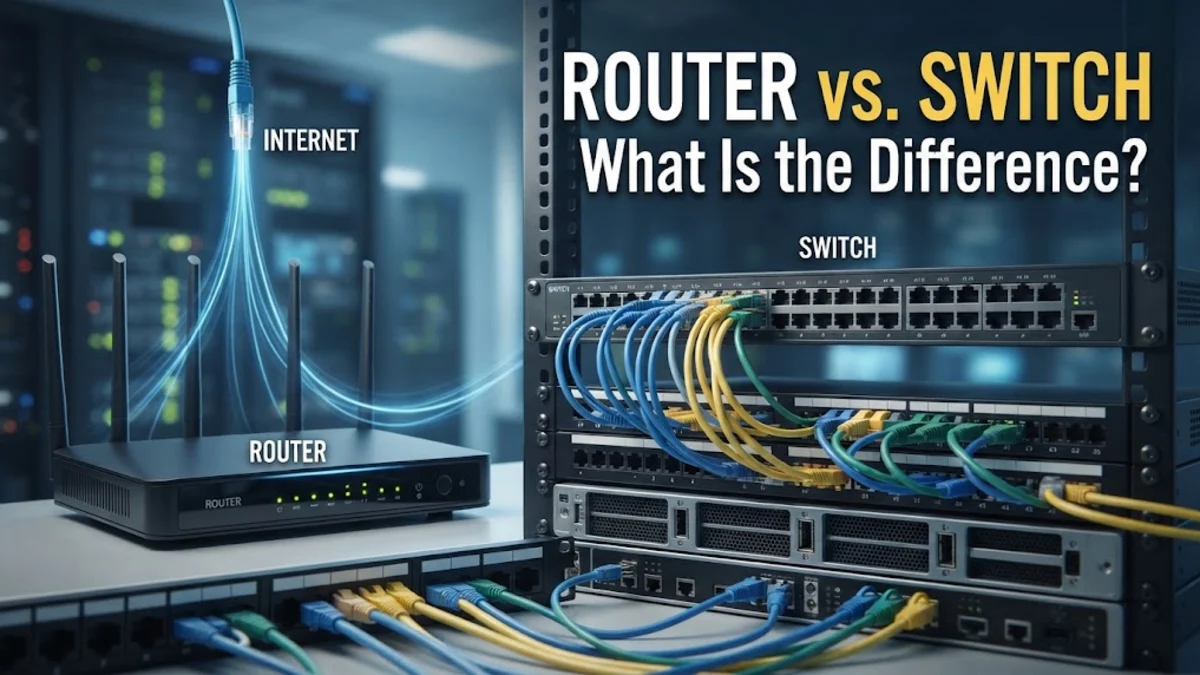
A router connects your home or office network to the wider internet and directs traffic between different networks, while a switch connects multiple devices together to form a single local area network (LAN). Understanding how these two foundational networking devices differ helps you build a faster, more reliable wired and wireless setup.
What Is a Router?
A router acts as the traffic controller and gateway between your local network and the outside internet. When you request a webpage, your internet service provider assigns your router a public IP address, and the router translates that data so all connected devices in your home can share the same internet connection. Modern residential routers combine multiple functions into a single box, including a modem, a local network router, a wireless access point for Wi-Fi, and a basic built-in ethernet switch with four ports. Routers inspect data packets and determine the most efficient path for information to travel from your devices to external servers across the globe. Without a router, your computers, phones, and smart home gadgets could talk to each other locally, but they would remain completely isolated from the World Wide Web. They also provide essential security features like firewalls and Network Address Translation to shield your internal devices from external cyber threats and malicious traffic originating from the public internet.
What Is a Network Switch?
A network switch is a dedicated hardware device designed exclusively to expand the wired capacity of a local area network. Unlike a router, which manages traffic flowing in and out of your local network, a switch focuses entirely on internal communication between devices connected via ethernet cables. When you plug a computer, network-attached storage drive, or gaming console into a switch, the switch creates a high-speed communication channel directly between those devices without burdening the router. Switches operate at the data link layer of network architecture and use Media Access Control addresses to route data packets only to the specific device that requested them, ensuring optimal bandwidth distribution across all connected hardware. Home network switches typically feature five, eight, or sixteen ethernet ports, while enterprise environments use large rack-mounted switches with dozens of gigabit or ten-gigabit ports. By adding a switch, you can overcome the physical port limitations of your primary router and connect a multitude of wired devices to your home network with minimal latency and zero packet loss.
Core Differences Between Routers and Switches
| Feature | Router | Switch |
|---|---|---|
| Primary Role | Connects local networks to the internet | Connects devices within a local network |
| Address Type | Uses IP addresses | Uses MAC addresses |
| Device Capacity | Typically 4 built-in LAN ports | Ranges from 5 to 48+ ethernet ports |
| Wireless Support | Usually includes built-in Wi-Fi | Strictly wired (no wireless support) |
| Traffic Scope | Inter-network and internet traffic | Intra-network local traffic |
How Routers and Switches Work Together
In most modern residential and commercial settings, routers and switches do not compete with one another; instead, they work in tandem to create a seamless network infrastructure. Your internet service provider line connects directly to your modem or combination modem-router, which brings the internet connection inside your building. The router then processes this incoming traffic and assigns local IP addresses to every connected device via DHCP. If you have more wired devices than available physical ports on your router, you simply run an ethernet cable from one of the router LAN ports into any port on a standalone network switch. The switch immediately expands your wired connectivity, allowing all connected computers, consoles, and streaming boxes to communicate with each other at maximum gigabit speeds while sharing the single internet gateway provided by the upstream router. This collaborative setup ensures that local file transfers, printer sharing, and heavy media streaming across your local wired network do not strain the router processor, leaving the router free to handle external internet routing tasks efficiently.
When to Use a Router
You always need at least one router in any home or office setup because it serves as the essential entry point to the internet. If you are setting up a brand-new internet connection, your first hardware purchase must be a reliable router or a combined gateway provided by your internet service provider. You also need a router if you require wireless Wi-Fi coverage for smartphones, tablets, laptops, and smart home appliances that lack ethernet ports. Furthermore, if you need advanced network management features such as parental controls, custom firewall rules, virtual private network servers, or guest network isolation, you must configure these settings directly on your router. Without a dedicated router, your local devices cannot establish an external connection, assign private IP addresses, or translate external web traffic into readable local data. Even if you expand your physical wired network with multiple switches, every single data packet destined for the outside internet must ultimately pass through your central router.
When to Use a Network Switch
You need a network switch when you exhaust the limited physical ethernet ports on your router and need to hardwire additional devices into your local area network. Standard consumer routers typically provide only four LAN ports, which fills up quickly if you have a desktop computer, a smart TV, a video game console, a network-attached storage server, and an IP security camera system. Adding a plug-and-play unmanaged switch instantly provides extra ports without requiring any complex configuration or technical knowledge. A switch is also invaluable in multi-story homes or home offices where multiple wired devices are clustered in a single room, allowing you to run a single ethernet cable from the central router to that room and connect all local equipment through a compact desktop switch. Additionally, heavy internet users, content creators, and competitive gamers rely on switches to maintain stable, low-latency wired connections across multiple devices simultaneously without experiencing the Wi-Fi congestion common in crowded wireless environments.
How to Choose the Right Networking Hardware
Selecting the correct networking hardware depends entirely on the layout of your home, the number of devices you own, and your specific bandwidth requirements. If you live in a small apartment with only a couple of wired devices and several wireless gadgets, a standard all-in-one Wi-Fi router is more than sufficient to handle your daily web browsing, streaming, and gaming needs. However, if you are outfitting a large family home or a home office with numerous desktop computers, gaming rigs, and network-storage drives, buying a gigabit unmanaged switch alongside your router is an essential investment. When purchasing a switch, look for gigabit-speed ports to ensure your local file transfers are not bottlenecked by older hardware speeds. For advanced setups involving office environments or specialized security VLANs, consider a managed switch that allows you to configure port priorities and monitor network traffic directly. Always evaluate your current hardware limits before buying extra equipment, ensuring your network can scale smoothly as you add more digital devices to your household.
The bottom line
Understanding the distinct roles of routers and switches empowers you to design a robust, high-performance home or office network. While the router manages your connection to the wider internet and assigns local IP addresses, the switch expands your wired capabilities so every device communicates smoothly.
Frequently asked questions
Can a switch replace a router?
No, a switch cannot replace a router because it lacks the ability to connect to the internet, assign IP addresses, or route traffic between different networks.
Do I need a switch if I only use Wi-Fi?
No, if all your devices connect via wireless Wi-Fi, you only need a wireless router or access point and do not require a physical network switch.
Does a switch slow down internet speed?
A high-quality gigabit switch does not slow down your internet speed; it simply distributes your existing bandwidth among all connected wired devices.
Can I connect a switch to another switch?
Yes, you can daisy-chain multiple switches together to further expand your network ports, though it is best practice to connect them back to the main router when possible.
What is the difference between an unmanaged and a managed switch?
An unmanaged switch is plug-and-play with no configuration options, while a managed switch allows advanced users to configure VLANs, monitor traffic, and prioritize specific data streams.