Why Is My Facebook Account Unavailable? How to Fix It
If you try to log into your profile and find that your account is temporarily or permanently unavailable, it can be frustrating and concerning. This usually happens due to suspected security breaches, violations of platform guidelines, or routine automated moderation flags designed to protect user data.
Fortunately, most unavailable accounts can be recovered by verifying your identity, following official appeal procedures, or securing your login credentials. Below is a complete walkthrough on how to diagnose the issue and restore full access to your profile safely.
Common Reasons Your Facebook Account Becomes Unavailable
Understanding why your account has been flagged is the first step toward getting it back. Automated security systems constantly scan the platform for suspicious login attempts, unusual traffic spikes, or mass messaging that mimics bot behavior. If an unauthorized person tries to access your profile from a foreign location or an unrecognized device, the system will immediately lock the account to prevent data theft.
Another frequent cause is a perceived violation of the community standards. Posting copyrighted material, engaging in aggressive commenting, or using a pseudonym that triggers automated filters can result in a temporary suspension or complete deactivation. Knowing the root cause helps you select the appropriate recovery path and prevents you from making mistakes that could make the lockout permanent.
Checking for Platform Outages and Network Errors
Before assuming your account has been disabled or hacked, you should rule out technical glitches or widespread server outages. Sometimes, an unavailable account error is simply the result of a temporary connection failure between your mobile application and the main data servers. Try opening the platform in a web browser on your computer instead of your phone, or switch from cellular data to a stable home Wi-Fi network.
You can also check independent status tracking websites to see if thousands of other users are experiencing sudden login errors simultaneously. If the platform is undergoing emergency maintenance or suffering from an outage, your account is likely completely safe, and service will typically return to normal within a few hours without requiring any intervention on your part.
Initiating the Official Account Recovery Process
If your account remains inaccessible and you suspect it has been compromised or locked for security reasons, you must use the official recovery portal. Navigate to the login page and click on the password reset link or select the option indicating that you cannot access your account. You will be prompted to enter your registered email address or phone number to locate your profile.
Once your profile is found, follow the on-screen prompts to receive a secure login code via email or text message. Entering this verification code confirms that you are the rightful owner of the contact information attached to the profile. After verification, the system will guide you through creating a brand new, strong password before restoring full dashboard access.
Submitting an Appeal for Suspended Profiles
If you receive a notification stating that your account has been disabled for violating terms of service, you will typically see an option to request a review. Click the button to submit an appeal, which opens a secure form where you can provide additional context or documentation to support your case. The platform's human moderation team relies heavily on clear identification during this phase.
You may be asked to upload a clear digital photo of an official government-issued identification document, such as a driver license or passport, to verify your legal name and birthdate. Ensure the photo is well-lit and all text is legible. Once submitted, reviews usually take anywhere from 24 to 72 hours, and you will receive an email notification regarding the final decision on your account status.
Securing Your Profile After Restoring Access
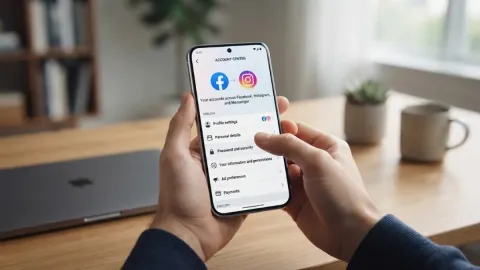
Regaining access to an unavailable account is only half the battle; you must immediately take steps to ensure it does not happen again. Start by navigating to Settings & Privacy > Settings > Accounts Center > Password and Security to review your active login sessions across all devices and immediately log out any unfamiliar computers or phones.
Next, enable two-factor authentication using a dedicated authenticator app or secure text message verification. This adds an extra layer of defense so that even if someone manages to guess your password in the future, they cannot breach your account without the secondary authorization code generated on your personal mobile device.
Best Practices to Prevent Future Account Lockouts
Maintaining good account hygiene keeps automated security filters from flagging your profile as a risk. Always use a unique password that you do not share with other web services, and update your recovery phone number and backup email addresses whenever your personal contact details change. Avoid clicking on suspicious links sent in direct messages, as phishing campaigns are the primary method attackers use to hijack active profiles.
Additionally, be mindful of how quickly you interact with content on the platform. Liking hundreds of pages, joining dozens of groups in a single hour, or sending too many friend requests to people you do not know can trigger anti-spam algorithms. Moderating your activity levels ensures your account stays in good standing and remains fully available for daily use.
The bottom line
Dealing with an unavailable account is stressful, but methodical troubleshooting and official recovery channels usually restore access successfully. By verifying your identity, strengthening your login credentials, and following platform guidelines, you can protect your digital profile and prevent future lockouts.
Frequently asked questions
How long does a temporary Facebook account lockout last?
Temporary security lockouts typically last anywhere from 24 hours to 48 hours, depending on the reason for the flag. Completing a password reset or identity verification can often lift the restriction immediately.
Can I recover a permanently disabled Facebook account?
If your account was disabled for a severe violation of terms, recovery is difficult but possible through the official review appeal form by submitting valid identification documents.
What should I do if I no longer have access to my recovery email?
During the recovery process, select the option indicating that you cannot access your current email or phone, and follow the prompts to provide a new contact method and upload identity verification.
Why did Facebook disable my account without warning?
Automated security algorithms constantly monitor for suspicious activity, spam bots, or severe policy breaches. If the system detects high-risk behavior, it disables the account instantly to protect user data.
Does Facebook customer support help with unavailable accounts?
Facebook does not offer direct phone or live chat support for standard consumer account recovery. All appeals and security checks must be handled through their automated help center and appeal forms.